 Damani Digital Learning
Damani Chief of Staff · For schools and districts
See every classroom’s writing on one rubric.
The district version of Damani Educator Assist, now in development. It is being built to give school and district leaders a fuller review of student writing, more consistent grades, and reteaching groups drawn from students’ actual results.
In Development The district view can be previewed now. Its figures are made up for three sample schools.

What leaders see
Four reports, built from the work students actually turn in.
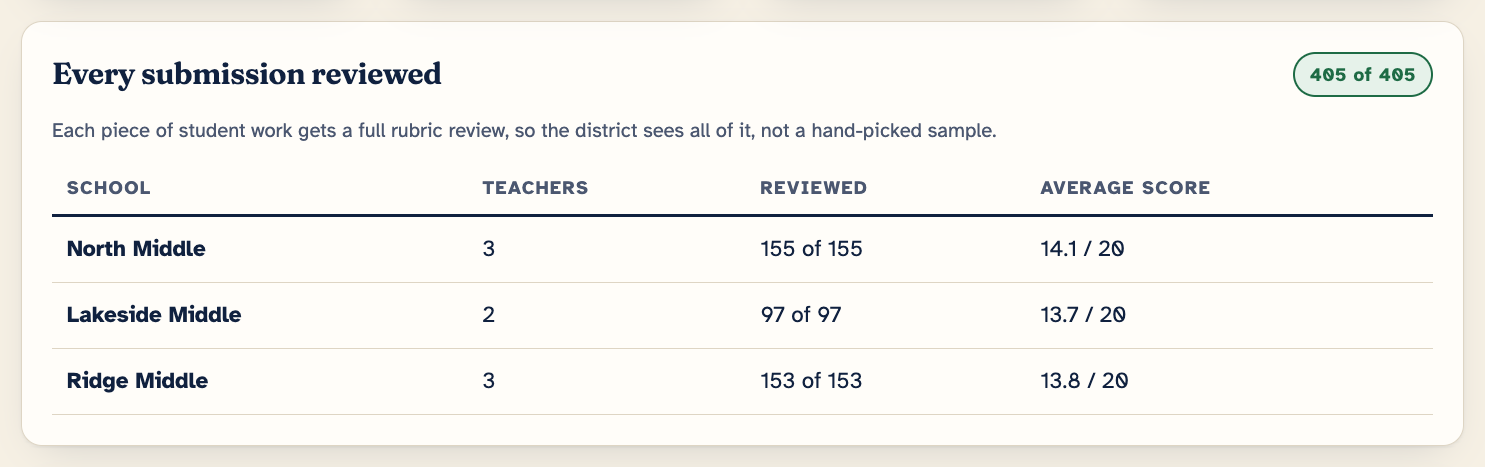
A fuller review of student work
Every submission is reviewed on the same rubric. Leaders see all of the writing, not a sample that each teacher selected.
More consistent grades
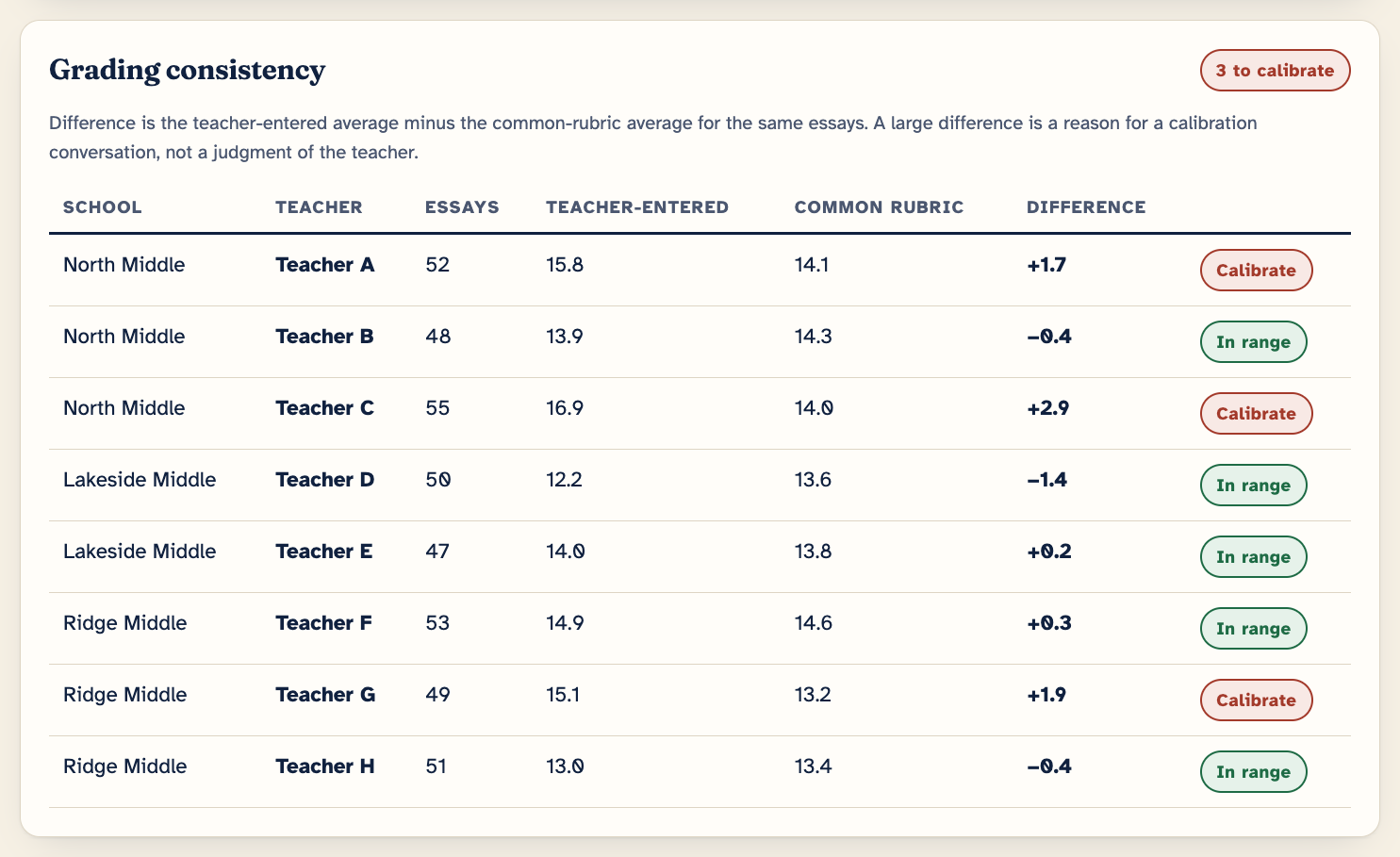
The report sets each teacher’s own grades beside the common-rubric score for the same essays. A large difference is a reason for a calibration conversation, not a judgment of the teacher.
Small groups from actual results
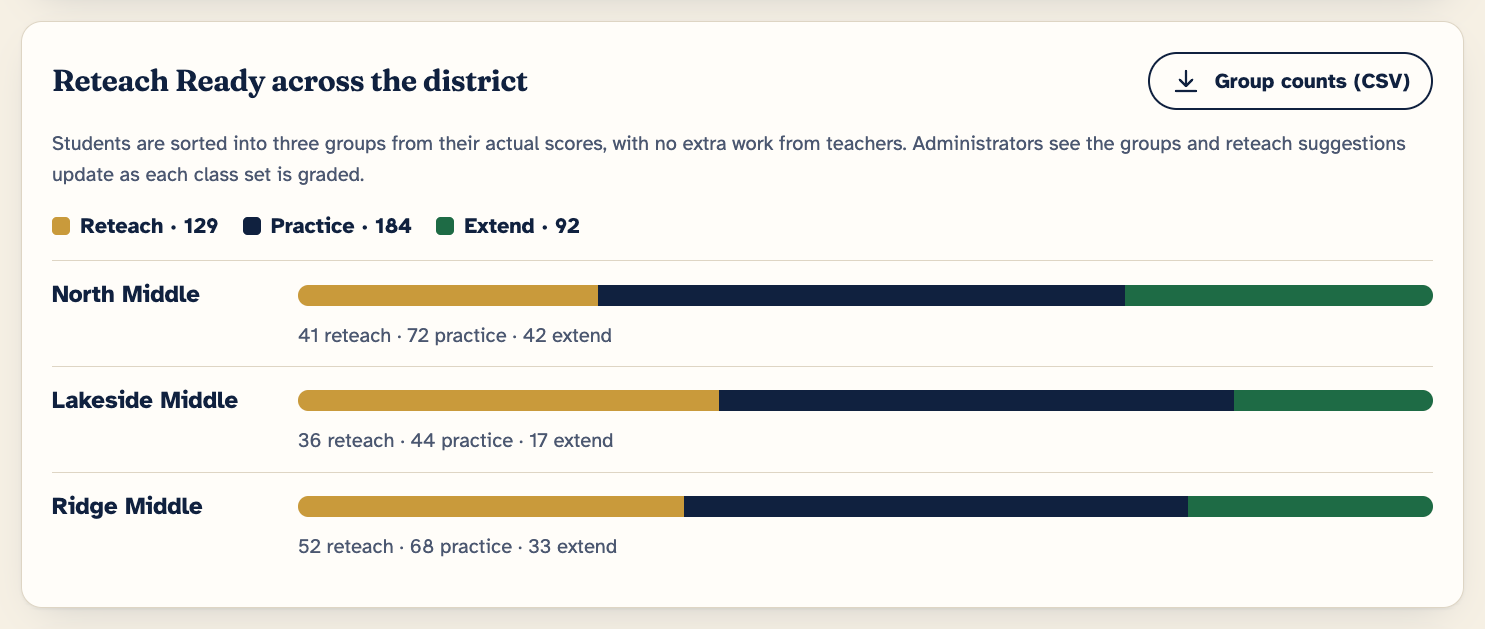
Students are sorted into three groups for small-group work and reteaching, from their own scores, with no extra work from teachers. Administrators can see the groups and the reteach suggestions as each class set is graded.
Standards to reteach
The report lists the standards where the most students fell short, each with a recommended lesson a teacher can open in one click.
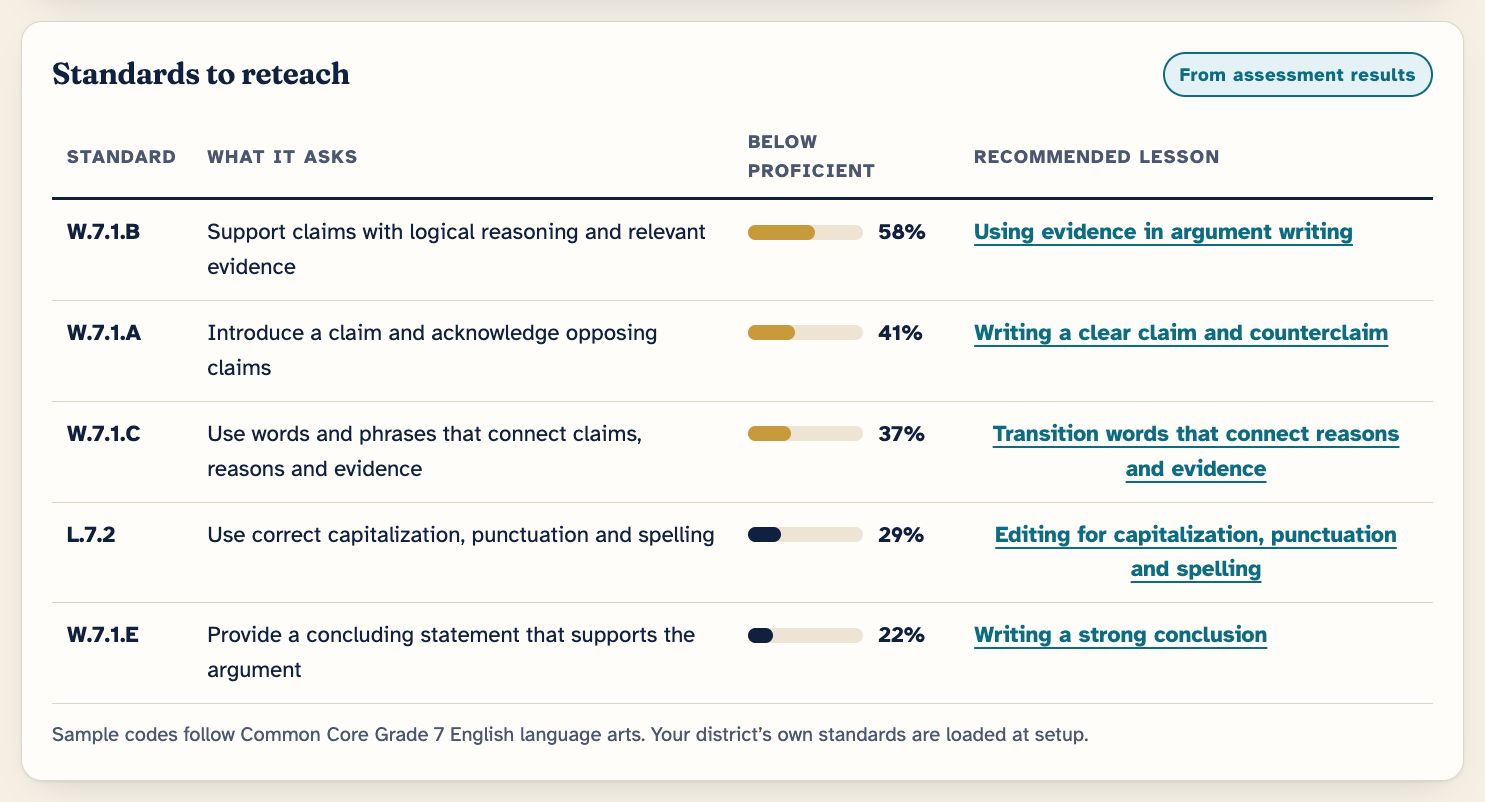
The reports above are screenshots of the preview. The schools, teachers and figures in them are made up.
Watch · 1 minute 17 seconds
The district view, start to finish.
A recording of the preview’s district view with made-up data. It is narrated, and the same words are on screen as captions.
Read what the video shows
- One view of student writing across every school.
- A fuller review. Every submission is scored on the same rubric, not a hand-picked sample.
- More consistent grades. See where teacher-entered grades differ from the common rubric. A large difference is a reason to calibrate, not a judgment of the teacher.
- Small groups from actual results. Students are sorted for reteaching, practice and extension. Administrators see the groups and reteach suggestions as each class set is graded.
- Standards to reteach, each with a recommended lesson. One click opens that lesson, ready for a teacher to build.
Founding pilot
Start small, with one school or one grade team.
Choose the team and the task
One school or grade team, and one writing task your teachers already assign.
Teachers grade as usual
Chief of Staff reviews every submission on the common rubric alongside them.
Leaders read the four reports
Then your team decides whether it has earned a wider rollout.
The founding pilot is free for founding partner districts. We are looking for those partners now. Pilots open once the live version and its privacy review are complete, and founding partners help decide what the first version must do.
For your review team
What is ready today, and what is not.
District teams commonly weigh a product on five questions. Here is where Chief of Staff stands on each, stated plainly.
-
Safe Is student data protected?
Not yetThe preview has no accounts, uses made-up data and sends nothing you type to us.
Before any pilot with real student work, the live version needs a privacy and security review covering FERPA, COPPA and your district’s data agreement. That review has not been done yet.
-
Evidence-based Does it work?
Not yetThere is no outcome study yet, and the scores in the preview are simulated.
The rubrics in the preview are general-purpose rubrics, not official state rubrics. A pilot is where scoring would first be checked against your teachers’ own.
-
Inclusive Can everyone use it?
Not yetAn accessibility review has not been done yet.
Lesson Studio has options to build in supports for multilingual learners and for students who need extra support.
-
Usable Will teachers actually use it?
Try it nowYou can click through the whole flow today, on a computer or a phone, with nothing to install.
Every score and comment is a draft until a teacher approves it.
-
Interoperable Does it fit our systems?
PlannedWord and CSV downloads work now.
Sending to Google Classroom, Canvas and Schoology is planned and is simulated in the preview. Rostering has not been built.
Planned pricing
One price for the whole school.
$5,000+ per school, each school year
- Educator Assist Premium for every teacher in the school
- The district view: the four reports on this page
How that compares. Premium for one teacher is planned at $19 a month, which is $228 a year. At the $5,000 starting price, a school with 22 or more teachers pays less than buying Premium for each teacher, and the district view is included.
Nothing is on sale yet and no payment is taken. The founding pilot is free for founding partner districts.
Questions leaders ask
Straight answers.
- Does it replace the teacher’s grade? No. Every score and comment is a draft until the teacher approves it. The district view sets the teacher’s grades beside the common-rubric scores so that teams can compare them.
- Is it used to evaluate teachers? It is designed for calibration: finding where grading differs so that a team can talk about it. The report says so on screen.
- Whose standards does it use? The preview shows sample Common Core Grade 7 English language arts codes. The live version is planned to load your district’s own standards.
- What do teachers get? The full teacher version: rubric scoring, feedback they approve, Reteach Ready groups and Lesson Studio. See Damani Educator Assist.
- What does a pilot cost? Nothing for founding partner districts. The price on this page is the planned licence after a pilot.
- When could a pilot start? Once the live version and its privacy review are complete. Email us to join the founding list and we will tell you where that stands.
Bring it to your team.
Preview the district view, or ask about a founding pilot for one school or grade team.